Help Link (?)
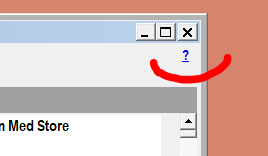
Many dsGST screens carry a small ? link in the top-right corner of the window. Click it and the help page for that screen opens in your web browser.
Using It
- Open the screen you need help with.
- Click the ? in the top-right corner of its window.
- Your default web browser opens on the matching topic of this help site.
Good to Know
- Only screens with a help topic show the link. If a screen has no ?, no page has been written for it yet. Help is being added screen by screen.
- It needs an internet connection to show the page. Without one, the browser cannot open the topic. The screen itself is not affected.
- The page is the one for that screen, not a search. It is the same page you would reach through the sidebar of this site.
- If a topic has been moved or renamed, the link still finds it — the program looks up the current page address each time, so help links do not go stale between program updates.
- If the topic cannot be found, the link opens the home page of this site instead.
- There is no keyboard shortcut.
F1is already used on several entry screens to jump between fields, so it is not used for help. - The link takes no permission. It does not change any data and is shown to every user.